Bookmarks, notes and reading lists

Every link worth keeping, in one quiver.

Quiver reads every page you save, so you can search for what it said instead of what it was called. Folders nest as deep as you like, and the good links go straight to friends.

Free · Full text search · Firefox and Chromium extensions · iOS shortcut · Public API

Click anywhere to loose an arrow and he'll fetch it.

>> what you get

For people who open forty tabs and close none of them.

Quiver is a calm place to put everything you meant to read, look up again, or send to someone.

Search for what it said, not what it was called

Quiver reads each page you save and writes a short summary and tags for it. Search covers those along with the full page text as you type, so the essay about rent finds its way back even when the title never mentions rent.

Save from wherever you are reading

Links land in Quiver from the browser, your phone, or your own scripts.

  • Firefox and Chromium extensions, one click
  • iOS share sheet, through a Shortcut
  • POST /api/arrows from any script
  • Browser bookmark import, folders and all

Folders that nest the way you think

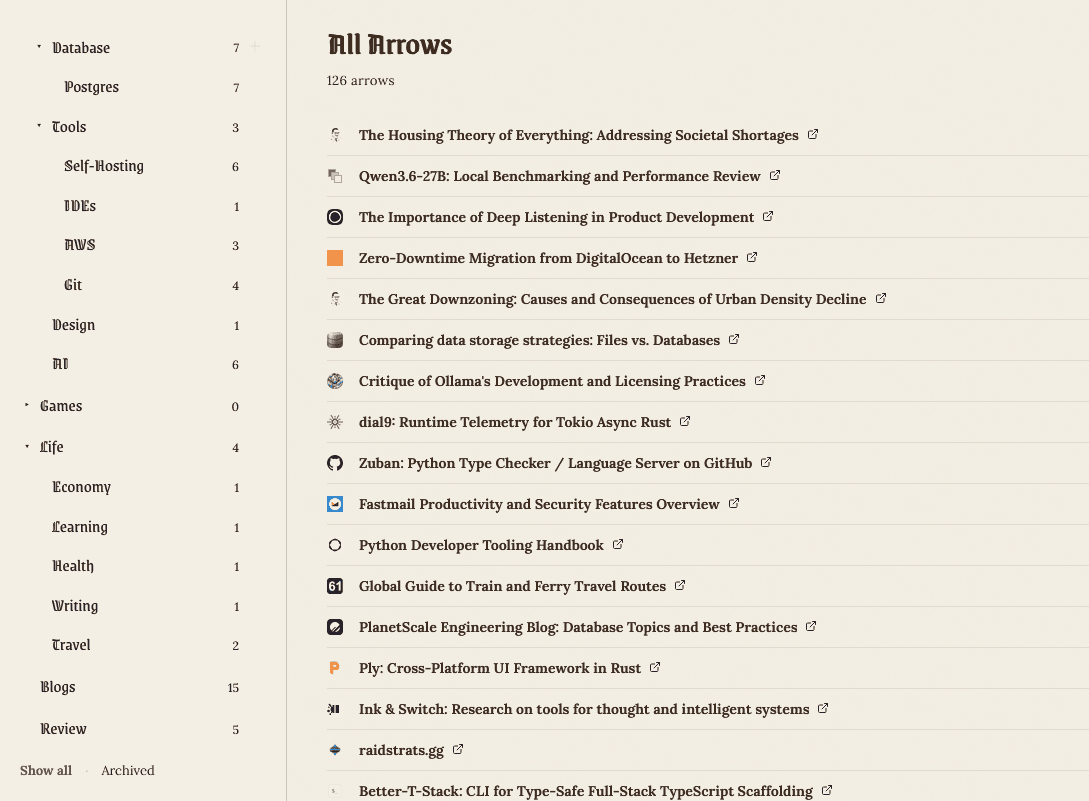
Put quivers inside quivers as deep as you need and tag across them. Titles and favicons fill themselves in.

The quiver view: nested folders in the sidebar and a list of saved links.

Hand a link to a friend

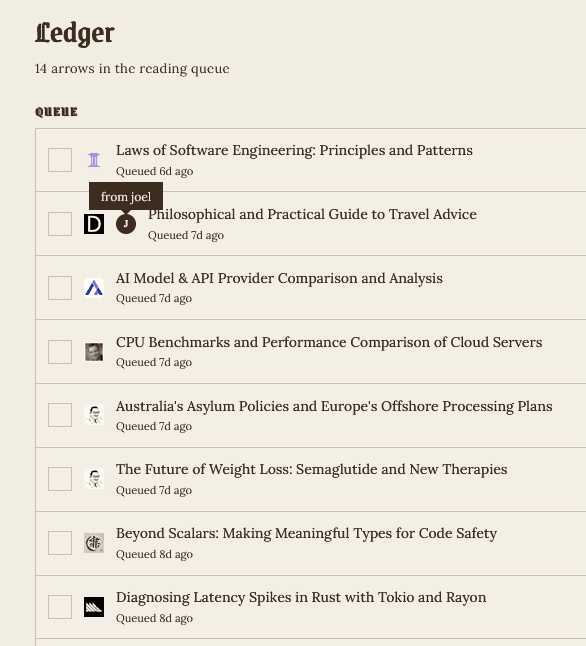
Drop arrows straight onto a friend's ledger, a shared reading queue they can tick off or keep. Links stop getting lost in the group chat.

The ledger: a reading queue of links, one marked as sent from a friend.

Notes live next to your links

Marks are Markdown notes, kept in journals the same way arrows live in quivers. Bring a whole Obsidian vault across as a zip and the folders stay intact.

## Sourdough, attempt four
* 78% hydration, 20% rye
* bulk until it jiggles
* see [[A Field Guide to Sourdough]]

Make it look like yours

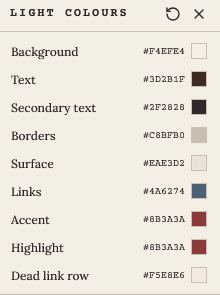
Light, dark, or a palette of your own. Pick the paper, ink, accent and rule colours with the colour picker in settings.

The colour picker with swatches for background, ink, accent and rule.

>> questions

Before you sign up

Setup guides live in the full FAQ.

Is Quiver free?

Yes. Sign up with an email address and a password and you can start saving straight away.

How does search find things the title doesn't mention?

Every page you save is read in the background. Quiver writes a short description, a summary and a few tags for it, then searches those along with the full page text, your folder names and the URL. Results update as you type and forgive typos.

Is there a browser extension?

Yes, for Firefox and for Chromium browsers like Chrome, Edge, Brave and Arc. The toolbar button saves the page you are on in one click.

How do I save links from my iPhone?

Install the Add to Quiver Shortcut and paste in an API key from your profile. It then shows up in the share sheet of every app.

Can I bring my existing bookmarks?

Yes. Export your bookmarks from Chrome, Firefox or Safari as an HTML file and upload it. Your folders become nested quivers.

Can I keep notes as well as links?

Yes. Marks are Markdown notes organised into journals, and you can import a zipped Obsidian vault with its folders intact.

What are friends and ledgers?

Everyone has a ledger, a reading queue that friends can add links to. Mark items as read, keep them in your own quiver, or clear them away.

What happens when I archive something?

Archived arrows are hidden from your main view but never deleted. Restore them whenever you like, or delete them for good once you are sure.

Is there an API?

Yes. Create a key on your profile page and send a POST to /api/arrows with a URL. The extensions and the iOS Shortcut use the same endpoint.
Draw your first arrow.

Free, and setup takes about ten seconds. Archived links are never deleted unless you say so.

Start your quiverAlready have one? Sign in